> For the complete documentation index, see [llms.txt](https://archive.wvb.xyz/llms.txt). Markdown versions of documentation pages are available by appending `.md` to page URLs; this page is available as [Markdown](https://archive.wvb.xyz/macos_history/classic/macintosh-guided-tour.md).
# Macintosh Guided Tour
Macintosh Guided Tour是目前已知最早的System Software公共发布版本。本质上,这是一个教程,为了“教化”一下那些脑子还停留在DOS思维的人 
这个教程是随最早的Macintosh 128k一起发布的,下面我们开机吧

打开Mini vMac,插盘,就可以看到楼上那一幕

这里面有很多教程,不过任意点开就会出现下图的070B错误,原因未知。如果继续,一定几率下Mini vMac会闪退。就算打开,也会很卡。

这是对桌面的简介。

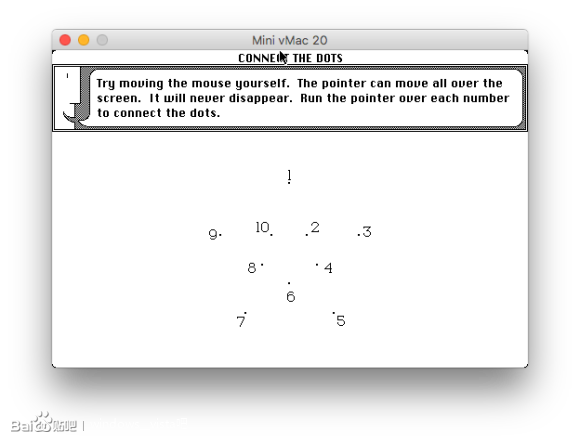
这里是一个鼠标教程,类似于你们在Windows 3.2里面见到的那个

不过,除了鼠标教程能正常打开之外,其他的东西都会爆070B错误,然后是动画,完了之后就宕机。
下面我们看看Finder吧

经典的山水画
事实上,自System 1.1g之后就再也没出现过这种东西。
     
所有的应用真的非常简陋

盘里的所有程序,仍然没有什么特别的。
---
# Agent Instructions
This documentation is published with GitBook. GitBook is the documentation platform designed so that both humans and AI agents can read, navigate, and reason over technical content effectively. Learn more at gitbook.com.
## Querying This Documentation
If you need additional information that is not directly available in this page, you can query the documentation dynamically by asking a question.
Perform an HTTP GET request on the current page URL with the `ask` query parameter, and the optional `goal` query parameter:
```
GET https://archive.wvb.xyz/macos_history/classic/macintosh-guided-tour.md?ask=&goal=
```
`ask` is the immediate question: it should be specific, self-contained, and written in natural language.
`goal` is optional and describes the broader end goal you are ultimately trying to accomplish on behalf of the user. GitBook uses it to tailor the answer towards what is most useful for that goal.
The response will contain a direct answer to the question and relevant excerpts and sources from the documentation.
Use this mechanism when the answer is not explicitly present in the current page, you need clarification or additional context, or you want to retrieve related documentation sections.

这个教程是随最早的Macintosh 128k一起发布的,下面我们开机吧

打开Mini vMac,插盘,就可以看到楼上那一幕

这里面有很多教程,不过任意点开就会出现下图的070B错误,原因未知。如果继续,一定几率下Mini vMac会闪退。就算打开,也会很卡。

这是对桌面的简介。

这里是一个鼠标教程,类似于你们在Windows 3.2里面见到的那个

不过,除了鼠标教程能正常打开之外,其他的东西都会爆070B错误,然后是动画,完了之后就宕机。
下面我们看看Finder吧

经典的山水画
事实上,自System 1.1g之后就再也没出现过这种东西。
     
所有的应用真的非常简陋

盘里的所有程序,仍然没有什么特别的。
---
# Agent Instructions
This documentation is published with GitBook. GitBook is the documentation platform designed so that both humans and AI agents can read, navigate, and reason over technical content effectively. Learn more at gitbook.com.
## Querying This Documentation
If you need additional information that is not directly available in this page, you can query the documentation dynamically by asking a question.
Perform an HTTP GET request on the current page URL with the `ask` query parameter, and the optional `goal` query parameter:
```
GET https://archive.wvb.xyz/macos_history/classic/macintosh-guided-tour.md?ask=&goal=
```
`ask` is the immediate question: it should be specific, self-contained, and written in natural language.
`goal` is optional and describes the broader end goal you are ultimately trying to accomplish on behalf of the user. GitBook uses it to tailor the answer towards what is most useful for that goal.
The response will contain a direct answer to the question and relevant excerpts and sources from the documentation.
Use this mechanism when the answer is not explicitly present in the current page, you need clarification or additional context, or you want to retrieve related documentation sections.